
Project visualization — Charlotte, USA.
Overview
Facade project: design to fabrication modelling · Location: Charlotte, USA
The scope covered the main curtain-wall style systems: vertical mullions, stack joints, transoms, glass and metal panels, and anchors. The workflow started with geometry analysis in Grasshopper, then moved into ruled panel layouts, attribute-rich geometry for fabrication, and scripted grouping so large panel families stayed manageable for production data.
The portfolio describes this as a single thread from design intent to fabrication-oriented outputs, with add-ons and custom code filling gaps that off-the-shelf components do not cover at this scale.
Scope and elements
| Element | Role in the workflow |
|---|---|
| Vertical mullions | Primary grid, spacing, and attachment logic |
| Stack joints | Vertical continuity and tolerances between stacked units |
| Transoms | Horizontal breaks, spacing to stack joints |
| Glass panels | Multiple types, sizes, and color / group coding |
| Metal panels | Solid infill alongside glazing |
| Anchors | Connection and fabrication-critical sizing |
Methodology
The workflow followed these steps:
- Geometry analysis in Grasshopper — Surface logic, divisions, and edge conditions for a highly articulated envelope.
- Paneling Tools — Panelization on complex surfaces with the Paneling Tools add-on for Rhino/Grasshopper.
- Elefront — Attributes, layers, and naming so Grasshopper and Rhino stayed aligned for export and downstream use.
- Custom C# components — For color grouping by glass size and for grouping mullion and transom lengths and orientations, i.e. fabrication-friendly batches rather than treating every instance as unique when tolerances allow.
Together, this supported a smooth transition from design to fabrication-oriented deliverables and reduced manual rework when the reference geometry moved.
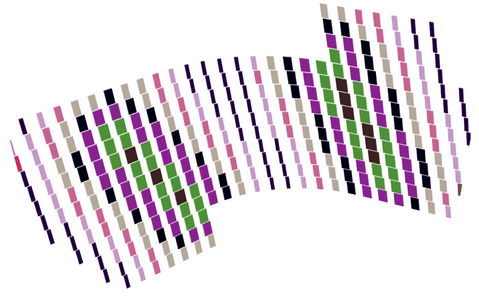
Parametric panelization and color-coded panel groups (glass / panel families).
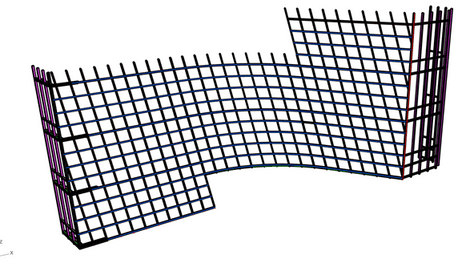
Structural / grid model — verticals, horizontals, and discipline-specific highlighting.
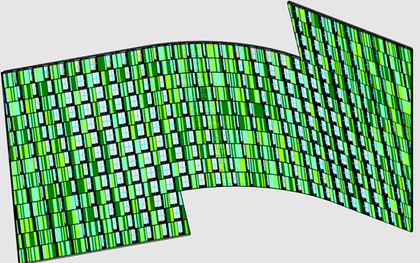
Panel module layout and material / opening rhythm on the curved facade.
Grasshopper logic (curtain wall types)
Definitions were organised by curtain wall types (e.g. CW1B / CW2B) with grouped canvases for stack joint, transom, and vertical parameter sets—sliders for mullion width/depth, spacing, divisions, and offsets—feeding curve/solid outputs and bake-oriented branches for Rhino geometry.
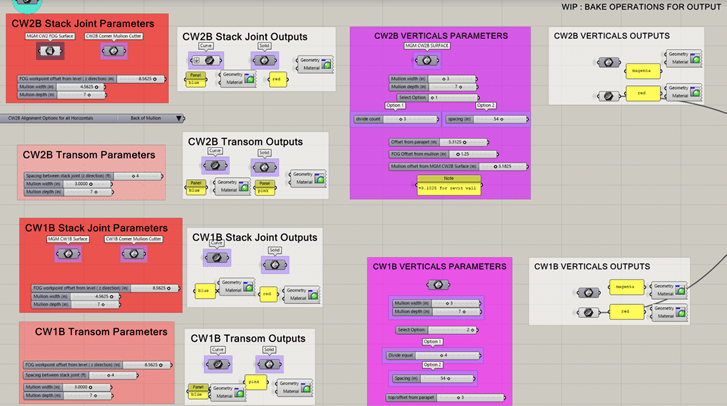
Excerpt: stack joint, transom, and vertical mullion parameter groups and outputs (WIP bake operations noted on canvas).
Workflow diagram
Reference surfaces
Base geometry & divisions
Paneling Tools + grid logic
Surface panelization
Per-component generation
Mullions, transoms, panels
C# grouping (glass, mullions)
Batch by size & orientation
Elefront attributes
Layers, names, export prep
Fabrication data / exports
Schedules & handoff
Reference surfaces
Base geometry & divisions
Paneling Tools + grid logic
Surface panelization
Per-component generation
Mullions, transoms, panels
C# grouping (glass, mullions)
Batch by size & orientation
Elefront attributes
Layers, names, export prep
Fabrication data / exports
Schedules & handoff
Challenges and how the stack addressed them
Geometric complexity — Thousands of unique panel configurations on a doubly curved envelope. Response: Adaptive panel logic tied to local surface conditions and Paneling Tools–driven grids, with Elefront carrying stable metadata.
Data volume — Very large element counts. Response: Elefront for attributes and batch-style C# grouping (sizes, lengths, orientations) so schedules and fab packages stay human-readable.
Design change — Late updates to reference geometry. Response: Fully parametric graph so upstream surface edits propagate to mullions, transoms, panels, and grouped outputs.
Tools
| Category | Tools |
|---|---|
| Parametric design | Rhino, Grasshopper, Paneling Tools |
| Data on geometry | Elefront |
| Custom logic | C# (Grasshopper components) |
Outcomes
- Automated generation of a large facade element set from a single parametric backbone
- Fabrication-oriented grouping (glass by size, mullion/transom families)
- Faster iteration when reference geometry or grid rules changed
- Clearer handoff from computational model to production data via attributes and naming