My role
I was BIM Coordinator on SFMM’s Kuwait International Airport package—new passenger terminal, carpark, and apron-related scope. My job was not only to keep federated models and clash programmes moving, but to make the weekly delivery machine reliable: who exports what, when NWCs land in which NWF, how NWD snapshots and Aconex steps run without someone re-clicking the same sequence for hundreds of models.
My intent
I wanted coordination time to go to coordination, not to copying files, renaming publishes, or rebuilding NWFs by hand. The programme was large (many Revit models, 10+ countries, Revit 2017 constraints), so my intent was twofold: protect model quality (BEP, QA/QC, clear registers) and remove repetitive work with Power Automate, Dynamo, and Python where the platform stopped short.
How I contributed
- Workflows & automation — I built and maintained Dynamo graphs and Power Automate desktop flows for the NWC → NWF → clash → NWD → CDE rhythm (folder setup, appends, registers, Excel links, archives).
- Process & templates — I helped shape procedures, templates, and model content so exports and handoffs stayed repeatable across terminal, carpark, and apron routes.
- Coordination execution — I ran coordination within the BIM Execution Plan: correct NWF sets, Clash Detective updates, timestamped NWD naming and revision folders.
- QA/QC — I applied hub standards: purge cadence, WIP views, CAD imports, LOD-style checks on assigned streams.
- Tooling where Revit 2017 fell short — I wrote and wired Python and Dynamo (and batch NWC paths via RTV / Prosheet-style jobs) so we were not blocked by missing newer APIs.
- People — I trained architects and engineers on BIM workflows and automation; I troubleshot broken flows; I worked with architects, engineers, and CM to clarify requirements and fix delivery gaps.
- Standards for a distributed team — I helped keep cloud/CDF paths, naming, and checklists understandable across languages and offices.
Context
Scope: Terminal (TEB), carpark, Package 3 / apron-style packages
Team: Coordination across 10+ countries
Platform: Revit 2017 — scripts and batch exporters as the practical upgrade path
Impact (team-wide)
After automation landed, on the order of ~40 hours/week of repetitive coordination labour was reclaimed for the wider BIM team—not a single-person metric, but the effect of the pipeline I helped design and run.

Overview — New Passenger Terminal II.
Project context
The expansion targets higher capacity and a better passenger experience, with strong design and infrastructure ambition. Client-side expectations included high-quality BIM models, dependable clash detection, streamlined workflows, and controlled data management across the federated environment—goals I aligned my coordination and automation work to.
Scale of the federated model
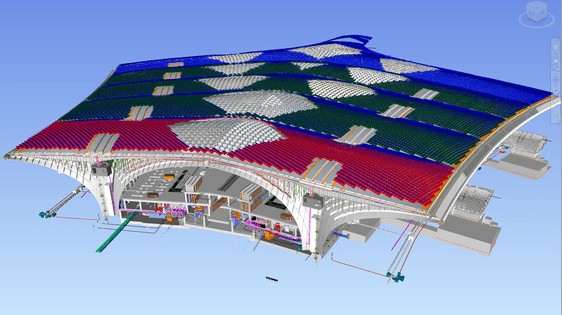
Federated terminal view — roof segmentation and internal MEP/structure.
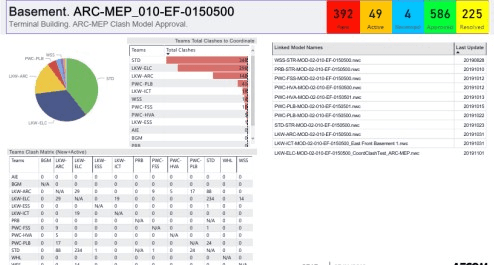
Clash programme view: status counts, team breakdown, clash matrix, and linked NWC update register.
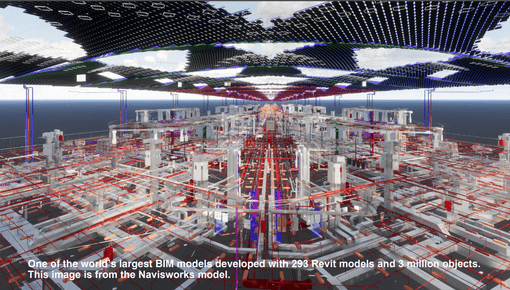
Navisworks coordination view — programme scale on the order of ~293 Revit models and ~3 million objects in the federated environment.
Weekly coordination rhythm
The diagram below is the week-shaped pipeline I operated inside and automated: cloud / Revit sync → NWC export → append to NWF live sets → Thursday clash tests and reports → NWD snapshots → Friday Aconex documentation and archives, with paths out to stakeholders.
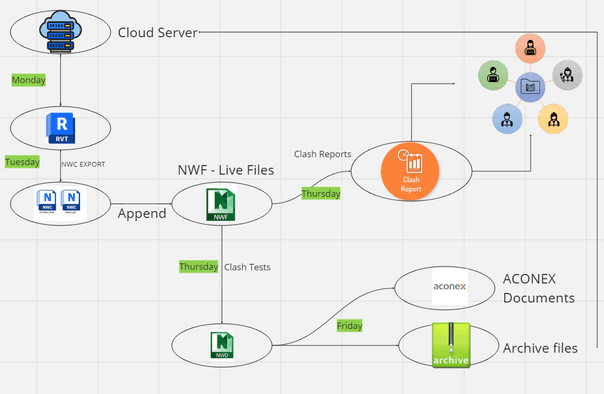
Weekly cycle: server → Revit → NWC → NWF → clash / NWD → Aconex & archive.
SFMM practice on the ground
Coordination sat under shared COR areas with coordination models and Navisworks file sets (NWF / NWD), discipline splits (ARC / STR / MEC / ELC, etc.), and explicit model lists for which packages got clash updates each cycle (terminal general weekly, interior & envelope monthly, carpark zones, and related routes).
- Sync & handoff — FreeFileSync-style jobs moved WIP to shared locations on a fixed weekday cadence.
- Batch Revit → NWC — RTV Batch Task Scheduler, Prosheet, or equivalent batch NWC jobs.
- Navisworks federation — Append NWCs to the right NWF, refresh Clash Detective, save federated state.
- Clash & snapshot — Timestamped NWD naming (e.g.
Project_YYYYMMDD) and revision folders. - Client CDE — Aconex register, transmittals, archives—often driven by Power Automate (folders, appends, register updates, Excel links).
Main challenges and solutions
| Challenge | How I addressed it |
|---|---|
| Data volume | Tiered federation (general weekly vs partial / monthly), registers for which NWF was current, batch export paths. |
| Repetitive weekly work | Power Automate flows and clear triggers for NWC → NWF → clash → NWD → Aconex; roughly ~40 h/week saved team-wide once adopted. |
| Revit 2017 limits | Custom Python, Dynamo, and batch exporters where native tooling was not enough. |
| Multinational team | Standard cloud/CDF paths, visual checklists, bilingual notes where needed, training on workflows and automation. |
Tools and technologies
| Category | Tools |
|---|---|
| BIM | Revit 2017, Navisworks |
| Federation & clash | NWF / NWD, Clash Detective |
| Automation | Power Automate (desktop + cloud patterns), Dynamo, Python |
| CDE & docs | Aconex, project SharePoint / shared drives |
| Sync & batch | FreeFileSync, RTV / Prosheet-style NWC batch |
| Scripting | PyRevit, custom Dynamo |
Outcomes
- Large weekly time savings on coordination mechanics (~40+ h/week for the BIM team).
- Stable federated models and clash snapshots for client review.
- Documented, teachable workflows (SFMM BIM Knowledge Hub) for onboarding and audits.
- Automation that applied across terminal, carpark, and apron packages.
Takeaways
I treat the weekly NWC/NWF/NWD/CDE cycle as one product: Power Automate only works once folder taxonomy and model lists are stable. Revit 2017 forced a script/batch layer—I invested there early so the team was not blocked. Standardise first, then automate.