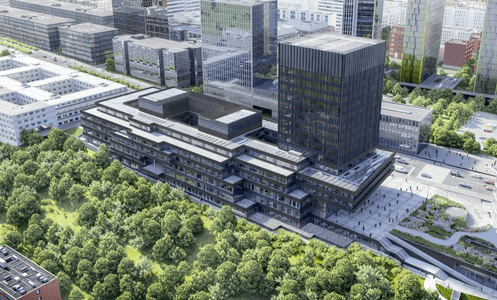
Visualization of the new EIB headquarters.
Overview
The project covers construction of the new headquarters for the European Investment Bank (EIB) in Luxembourg. The facility is designed to improve operational efficiency and capacity while meeting sustainability and environmental goals alongside the bank’s day-to-day needs.
Key deliverables included high-quality BIM models, reliable 2D documentation, and structured data for 4D (scheduling) and 5D (cost) use—so planning, coordination, and financial tracking could stay aligned with the federated model.
Roles and responsibilities
- Structural BIM coordination — Federated structural models, links, and discipline interfaces in line with SFMM and client standards.
- MEP openings coordination — Managing mechanical, electrical, and plumbing openings in structural elements so penetrations stay compatible with structure, reinforcement, and fire strategy, with clear ownership in the issue loop.
- QA/QC and model cleaning — Quality assurance and control through model cleaning, checklists, and repeatable checks so Navisworks and CDE reviews see consistent geometry and metadata.
- BIM LOD matrix and data management — Maintaining Level of Development (LOD) expectations and parameter discipline so models stay complete and usable downstream.
- 4D and 5D execution — Parameters and element mapping for 4D scheduling and 5D cost, synchronised with the tools below.
- Parameter management — Consistent parameters across models for IDs, locations, executed status, and reporting.
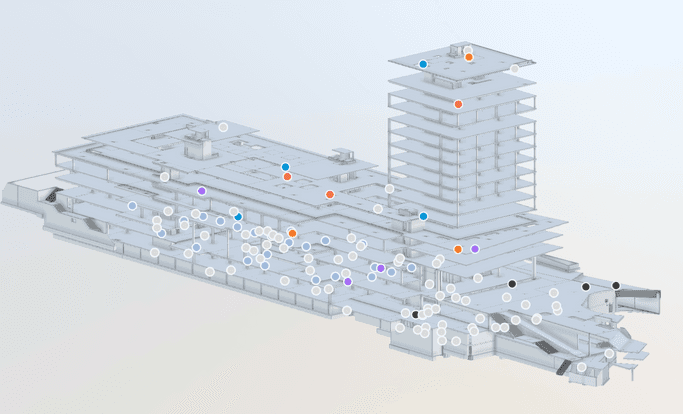
Structural / federated view with coordination markers (issue tracking and opening-related review).
Challenges and solutions
MEP–structural coordination
Issue: Cutting and managing openings on structural elements for MEP was time-consuming and prone to communication gaps.
Solution: Dynamo was integrated across the openings data flow to control and batch opening-related work, streamline copy/monitor style handovers, and keep teams aligned in ACC and BIM Track so actions stayed traceable and timely.
At SFMM this sat alongside BWO coordination patterns—structured handling of opening objects, host–opening parameter relationships, and federated review in Navisworks without silent mismatches.
Model cleaning and checklists
Issue: Large model sets and detailed checklists made manual QA heavy.
Solution: Batch processes for model-checker style automation using Dynamo, reducing time for model cleaning and checklist generation while keeping a monthly QA cadence.
Identity and reporting drift (technical depth)
Issue: Spreadsheets and Revit could diverge on what was built and where.
Solution: Reusable Dynamo graphs from the SFMM / EIB library—for example UUID → UniqueId, location parameter transfer, executed elements from Excel, and door keynote transfer—so updates stayed bidirectional and auditable where those workflows applied.
Model backup and sync
RVT and NWC snapshots were mirrored to project/remote storage (FreeFileSync-style jobs) so coordination had a recoverable line if a publish or link set failed.
Tools and techniques
| Tool | Role |
|---|---|
| Navisworks | Clash detection, federated reviews, BWO-style coordination |
| ACC (Autodesk Construction Cloud) | Models, issues, publish packages |
| BIM Track | Coordination issues, accountability, workflows |
| OpenSpace | As-built capture linked to model context for 4D/5D inputs |
| Synchro | 4D scheduling sync |
| Bexel Manager | 5D cost / quantity alignment |
| PyRevit | Day-to-day modelling and coordination automation |
| Dynamo | Openings data flow, batch checks, ID/location/executed-element workflows |
Model files (struct + links)
        │
        ▼
Dynamo / PyRevit — batch checks & data bridges
        │
        ▼
QA outputs + ACC / BIM Track issue closure
Outcomes and impact
- Higher efficiency — Automation with Dynamo and PyRevit improved MEP–structural coordination and model management.
- Clearer communication — Shared issue tools and structured data flows reduced friction between teams.
- Strong deliverables — Model quality, LOD discipline, and client standards supported positive client feedback.